The How to AI series covered the why and the what. Here’s the junk drawer of AI pro-tips that I couldn’t squeeze in.

Pro Tip #1: Typing > Talking
Talking is 8x faster than typing. Also- it’s something you can do walking through a sunny forest rather than in your basement office. Here are two tools I use to speed up, save brain power, and get outside. They are perfect for my often rambling “context dumps” that I do when starting new projects.
Wispr Flow — Lightweight best-of-its-kind AI-powered desktop transcription app. Hold a key, talk, and it types for you. Works in any app / site on your computer. Takes getting used to but I use it almost as much as my keyboard now.
Otter — Phone app that records and transcribes long conversations (or self rambles) on your phone. Great for Talk through an idea on a walk, hand the messy transcript to Claude to clean up, organize, and convert to project instructions or whatever you need.
Both free!
Pro Tip #2: Let it ask you.
If you're new to AI you may be wondering: what are the relevant things that I should be telling it? How do I know what it needs?
The secret is to stop racking your brain and let it just ask you. When in doubt, just add something like this onto the end of your prompt:
"Before you answer, ask me questions one at a time until you're sure you understand what I need."
Pro-Tip 3: Tell it how you like things.
I talked about saving context on projects in The Expert. Zooming out you can do the same thing for all your interactions with Claude. In the settings, use Global instructions to explain how you'd like Claude to think and communicate.
Personally, my global instructions are centered around simplifying towards action (“don’t suggest 10 ideas. Give me the one I need to do”) and being concise. Here is a semi-embarassing actual line from my global instructions:
Treat my brain energy as the most valuable thing in the universe. I value your responses, but think hard about how to get those responses into the most concise, brain-friendly responses possible. I want to get more value per output word than any other Claude user.
Pro-tip #4: Stay Organized
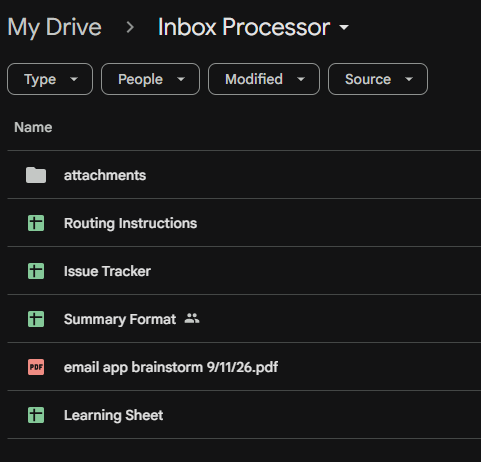
In Claude Code, simple apps can start with a conversation. For more complicated apps you're going to want to do some really simple basic “product owner” practices.
Make a folder for your Claude project in Google Drive and keep everything in there.
Create an issue tracker for tracking all your bugs, new feature ideas, and improvements, which you will surely have over time.
Start very small and iterate slowly rather than trying to build a huge thing right away
Pro-tip #5: Use Cowork (on the latest model)
If you think you might get into AI, pay the $20/month to Anthropic. That gets you access to Claude Cowork (the desktop version) and Code. The AI under the hood is way powerful than ‘Chat’ and operates on your computer so it can do rather than just think. Chat really is just for using on your phone.
Pro-tip #6: Learn from the sickos
Ruben Hassid is who I follow, but just know there are obsessed people out there who are able and willing to share what they are learning out on the bleeding edge for the rest of us.
Pro-tip #7 Learn the other basics
Show it what good looks like. "Write it like this" beats three paragraphs of description.
Tell it who it is. "You're a fee-only financial planner talking to a family of five" gets a different answer than a bare question.
Push back. The first answer is a draft. Try: "What would an expert hate about this?" Then: "Fix it."
Start fresh. Long chats get confused and eat up ‘tokens’. When it starts forgetting things, have Claude create a summary of the chat up to this point, open a new chat, paste in the summary, and continue.
/skills are sweet! (If you have recurring tasks that you want to work across projects, just hit /skill-creator and explain what you need.
PLEASE share any cool stuff you’ve done with AI in the comments below or hit me at brett@brettwrites.com!
Ok, go get ‘em.